
Agentic AI – Personal RAG System
An overview to creating a chatbot that can ingest PDF or TXT documents and answer questions directly from their content.

With all the noise around on AI these days, it’s easy for developers especially beginners to feel overwhelmed. Questions like “How do I start learning AI?” or “Where should I begin?” are common. If you’re asking yourself the same, you’re in the right place. This blog is designed specifically for beginners and will walk you through the basics to help you take your first steps into the world of Agentic AI.
Intro :
In this post, I’ll walk you through how I created a personal chatbot powered by Retrieval Augmented Generation (RAG). This chatbot can take a PDF or TXT file, understand its context, and answer your questions using the provided context.
To make it even more useful, I have also added MCP (Model Context Protocol) server functionality, so it can be plugged into AI assistants like github-copilot.
The complete code is available on GitHub — feel free to use it as a reference 👉 Link Here
What is RAG :
Traditional LLMs answer questions from their training data and it can be outdated. Whereas RAG system enrich LLMs by providing relevant data from external knowledge base (like pdf, txt or Database). The LLM then answer based on retrieved context.
Now, I’ll walk you through the architecture.
Architecture :
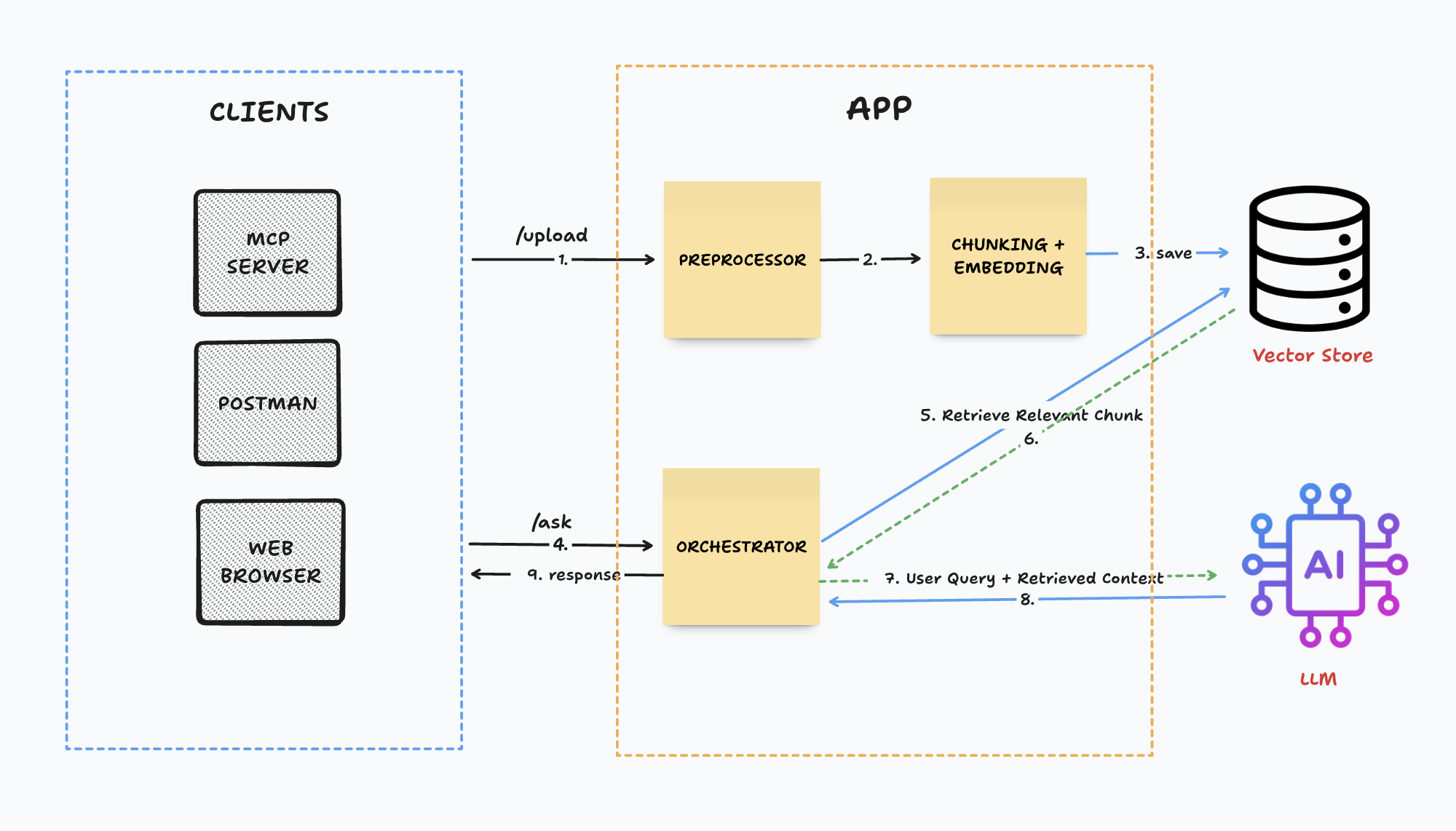
Let’s understand the core part (APP) first :
Upload :
It’s an exposed rest api in our application to upload a pdf or txt file from which we want to ask questions. We can extend it further to upload context from other data formats.
Preprocessor :
Preprocessor are going to parse the data and convert into a format(ie. json or txt), in which application can easily process the data further. Tools like pdf-reader can be used.
Chunking :
After parsing the data, the next step is to split it into manageable chunks. This ensures that when providing context to the LLM, only the most relevant chunks are passed instead of unnecessary data. The text should be split in a way that related chunks can be retrieved easily during a query. The chunk size depends on both the application requirements and the type of data being processed. Additionally, using a chunk overlap helps in maintaining context across adjacent chunk.
Tools like LangChain’s TextSplitter can be used for Chunking. Code example :
import { RecursiveCharacterTextSplitter } from "langchain/text_splitter";
const splitter = new RecursiveCharacterTextSplitter({chunkSize: 1000, chunkOverlap: 100});
await splitter.splitText(text)
Embedding :
After splitting chunks, we need to create embedding for each chunk. An embedding is a numerical representation of text designed to be consumed by semantic search algorithms. These embeddings are stored in a vector database so we can quickly retrieve the most relevant chunks later. For embedding tools like @xenova/transformers or OpenAI embeddings can be used.
import { pipeline } from '@xenova/transformers';
const embedder = await pipeline('feature-extraction', 'Xenova/all-MiniLM-L6-v2');
const emb = await embedder(chunks[0], { pooling: 'mean', normalize: true }); // only for first chunk (do it for all)
Vector Store :
A vector store is a special type of database used to save embeddings. When a user asks a question, the system looks up the most similar vectors in the store and retrieves the related chunks. Popular vector stores are Chroma, Faiss and Pinecone.
// Install Chroma
chroma run
// Use it to save embeddings
Ask :
Similar to upload it’s an exposed rest api in our application to ask questions from provided context. This Api will return response from only provided context.
Orchestrator :
When the application receives the user query, it generates the embedding of the query and uses it to retrieves the most relevant chunks(number of chunks can be specified) from the vector store. These retrieved chunks, along with user query and custom prompt are then passed to LLM for summarizing and rephrasing of the response.
import OpenAI from "openai";
const openai = new OpenAI({ apiKey: OPENAI_API_KEY });

await openai.chat.completions.create({
    model: "gpt-4o-mini",
    messages: [
      {
        role: "system",
        content: "You are a personal knowledge assistant. Use only the provided context to answer."
      },
      {
        role: "user",
        content: `Context:\n${retrievedChunks}\n\nQuestion: ${userQuestion}`
      }
    ]
  });
LLM :
Here, LLM (large language modal) role is to process the given prompt, which includes retrieved context, user query and custom prompt. it than generates a summarized and well-phrased response which can be returned to user.
LLM modals are : GPT-4, LLaMA etc.
🎉 Now we have an ready to use RAG modal, which can answer questions from provided context 🎉
Let’s move to connecting it with a tool which can communicate with it :
MCP Server :
An MCP server, or Model Context Protocol server, is a program that exposes specific capabilities for AI applications to interact with LLMs and AI agents, through a standardized protocol. MCP is just a protocol similar to other protocols ie. http.
You can think of MCP as a USB-C port for AI applications. Just as USB-C provides a standardized way to connect electronic devices, MCP provides a standardized way to connect AI applications to external systems.
In this project, we’ll be using an MCP server to connect with the /ask REST endpoint.. You can check out the implementation here.
All the detailed instructions are available in the Readme file.
I hope you found this helpful 🙂 – Thank you for reading :)